

The perfectionist's guide to having fun consuming a list of media and not freaking out about failure.
With the new year just behind us, I know plenty of people are starting up their New Year Resolutions, and possibly have already failed them (you know who you are). And with resolutions for the year quite possibly comes looking at your backlog and thinking…man, I sure do got my work cut out for me this year.
I’m here to tell you that your backlog does not have to cause you torment. No longer will looking at your backlog cause you incredible distress; instead, it will inspire.
I hope. Let’s get into it!
But first, I do need to shill my service to y’all here, which I do for free and is free for y’all to subscribe to. If you like what you’re reading so far, and want my newest posts sent directly to your inbox, go ahead and subscribe!
It’s free of charge, and doesn’t require an account to do so. My main posts are posted weekly on Wednesdays at 3 PM EST, and my Sunday Mini Stackin’ series are posted every other week on Sundays at 7 PM EST. If you like games, fandoms, and books, this Substack is the perfect read for you!
Also, if you like what you’re reading here, consider supporting me on Ko-Fi! You can pledge your support once, or subscribe to one of my tiers to get access to exclusive, behind-the-scenes content!
Alright, let’s get back to it!
Assessing Your Current Backlog
Let’s start with the basics. I’m assuming you already have a backlog, but if you don’t, it could be a good exercise to write down everything you want to play/read/watch in a dedicated spreadsheet. You can have separate spreadsheets per interest, or put them all in one spreadsheet for easy viewing. I, myself, have three spreadsheets: one for general media consumption in the year, one dedicated to video games, and one dedicated to books.
Take a look at your spreadsheet. How are you organizing it? How many tabs do you use? Do you have a tab for your up-next media? Let’s start there.
Nine times out of ten, your TBR or your up-next games or whatever it is called is probably causing you the most stress. Giving yourself a dedicated list of what you want to consume next is nice to keep in mind, but ultimately could be giving yourself a timeline for what you should be consuming next. You’ll look at the list while consuming a different piece of media and think “man, I can’t wait to watch/read/play this” or “I need to get through this media so I can get to this.” It’s always going to be about the future, and never the present.
And that’s the thing, right? Focusing on the future is never going to give you enough time with your current piece of media. I’m not saying get rid of your up-next list, because sometimes, it’s important to keep track of what you have and what you want to consume next (especially if you’re working around library loans). I’m saying that if it is the cause of stress, maybe shift the lens of focus there.
Are you giving yourself due dates? Telling yourself that you have to read two books a week or three games a month? Are you dictating how long each media is, and choosing what to consume next based on how short something is, avoiding anything that’s more than 500 pages, more than 30 hours to complete?
Giving yourself set rules or guidelines to follow in the backlog is nice, but ultimately, the backlog is not something completeable on a timeline. You won’t finish your backlog in a year, or two, or five. It’s not possible, and expecting as such is just going to set you up for failure. If you have a backlog, that backlog is a lifelong investment. You will forever add more things to the backlog, forever making it longer and longer, until it’s too hard to manage.
Except, maybe it doesn’t have to be that way. Maybe, you can prioritize certain things and give yourself the leeway to consume what you want when you want to, and balance it so you can check off a reasonable amount of media. Maybe, you can finish the priorities without it feeling like a heavy burden.
Crafting A New Backlog
Let’s start with the main list itself. My backlogs usually list out the title of the medium, any important information about it, and whether or not I own it. This last step is crucial if you don’t already have it on there, as having access to consuming the media at hand might be what separates the “compleatable” games/books from the “uncompleteable.” If you literally can’t get your hands on the game/book at hand, then why bother pressuring yourself to worry about finishing it?
From there, I detail information about how the game/book was finished. This should be added to your backlog if it isn’t, as it gives incentive to finish something without the pressure of a schedule.
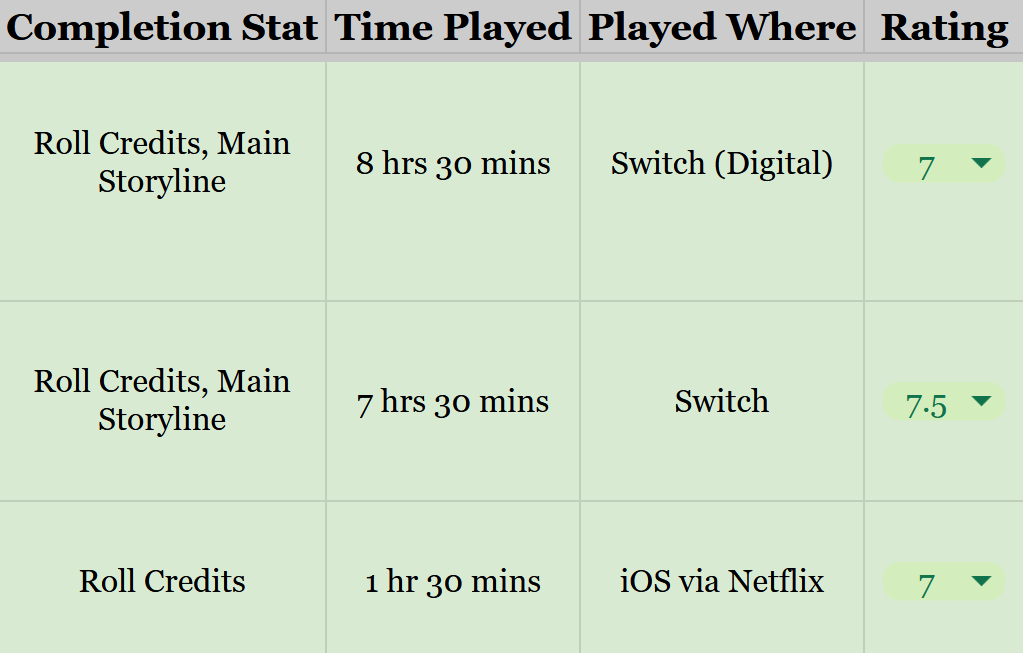
Depending on the medium your working with, you’ll end up listing different things. For example, my video game backlog lists how I completed the game (completion status), how long it took for me to beat the game (sometimes an estimate), where I played the game, and what I would rate it on my scale (1-10 half-star system). On the other hand, my book backlog only lists how I read the book (eBook/Physical) and the rating.
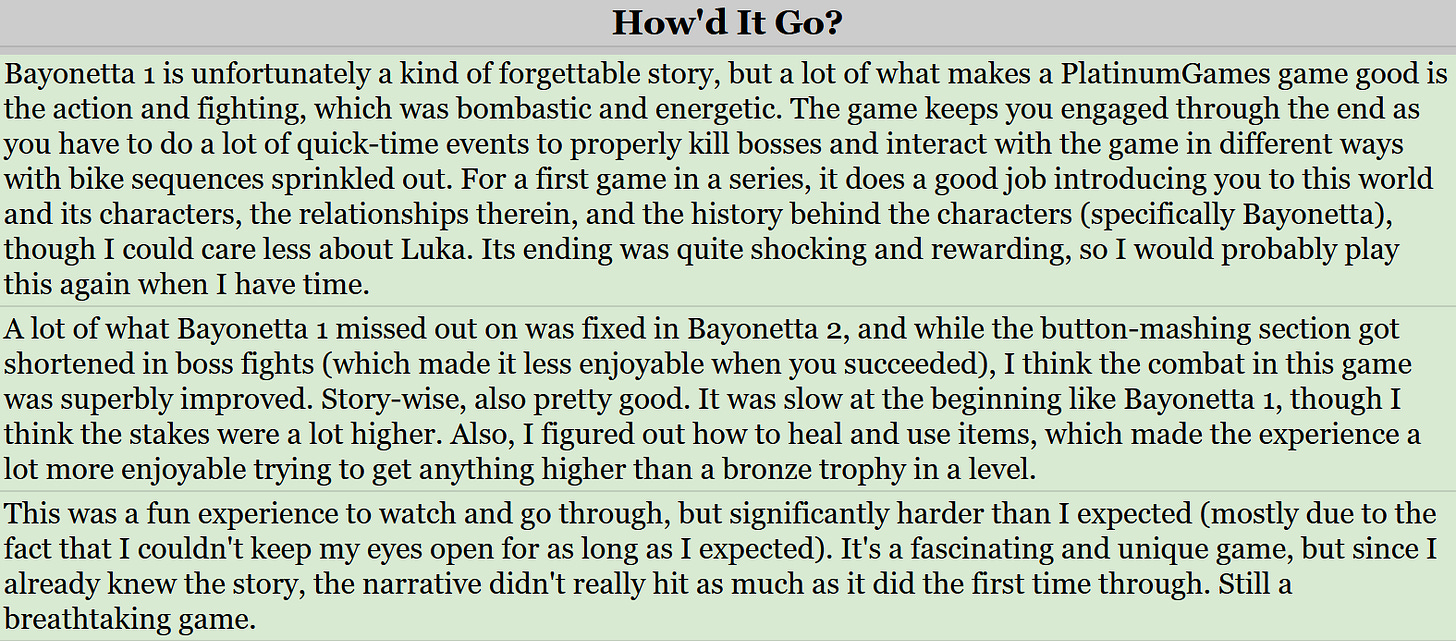
Another thing you should consider adding to your main backlog list is a “notes” or “how’d it go?” section. Some kind of section where you can quickly rant about what you liked and disliked about the game/book. Honestly, this is my favorite part about finishing something on my backlog, mostly because some books/games have that one thing in it that absolutely irked me, and because I like to keep my social media spoiler-free, I can be as savage about the book/game as I want. I also think it’s good for memory’s sake, so you’re not just completing something and forgetting it immediately after. And, like, it’s probably good for your mental health to have a space to rant about something without having the eyes of hundreds—if not thousands—on it, ready to jump you for your opinions (which you’re allowed to have, by the way).
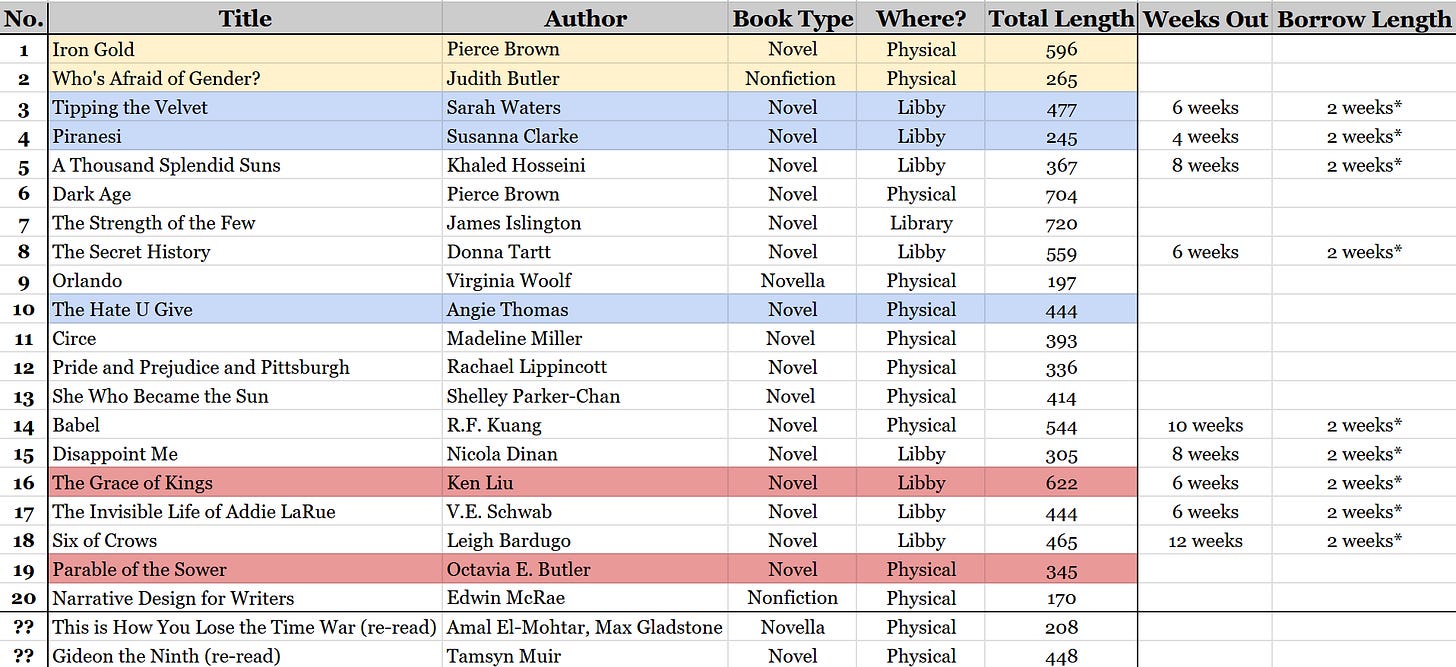
I also like to color code items on my lists, though too much color coding might get annoying. Generally, I’ll highlight a list item green when I finish it, blue if it’s on my to-read/to-play list, gold if I’m currently playing/reading it, and red/teal if I’ve put the item on pause for whatever reason.
Speaking of to-read lists, let’s move on to that next. However you name it, I would recommend making a separate list of the books/games that you want to read/play next. Lay it all out, and don’t be afraid to put re-read or re-plays on it as well. I’ve found that listing out every single game I want to play in an order can be stressful because a lot of the time, what I’ve listed out might not be what I want to play and it doesn’t leave room for new additions to the list.
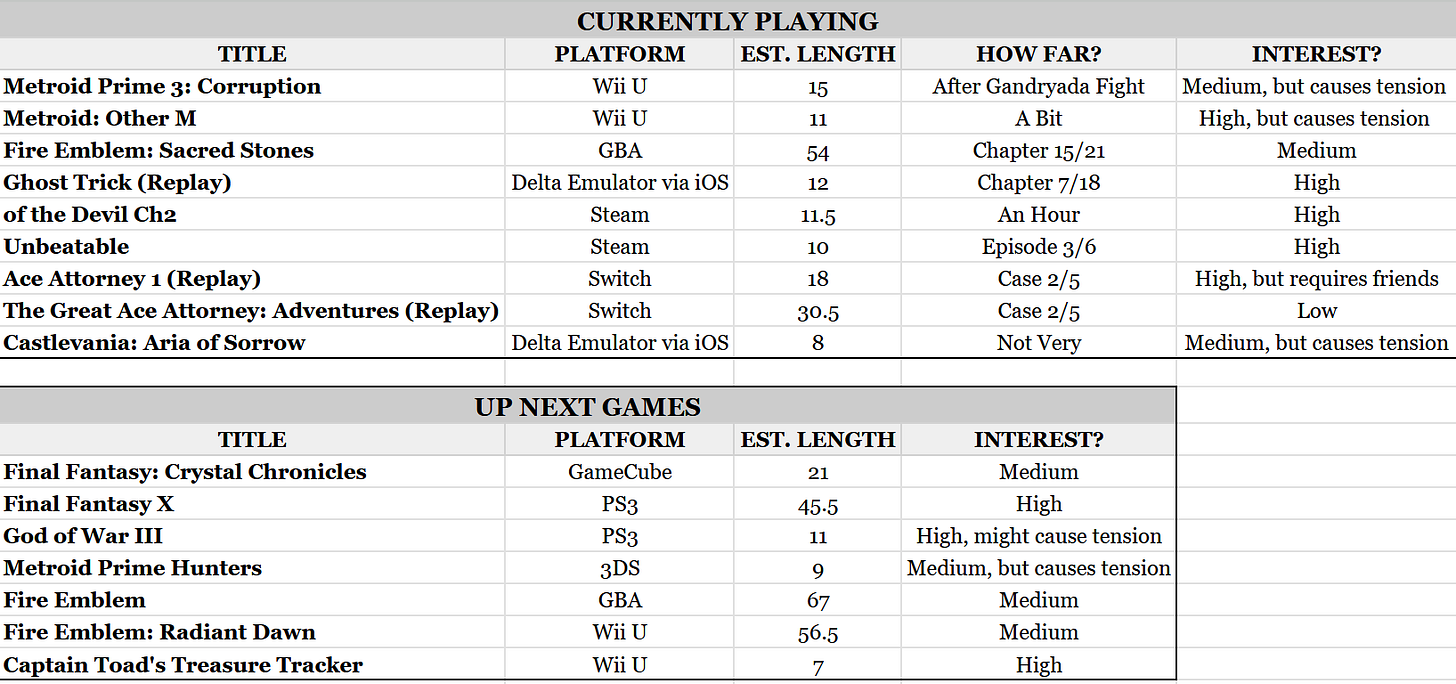
What worked the best for me was to make an external list of every single game I have access to and want to play, highlighting all of them on the backlog (i.e. my blue color code), then creating a small list of up-next games on a different tab. I prioritized five or so games I’m currently in the middle of at the top, how far I am in the game (a vague approximation that doesn’t have to be time spent), and also listed out how excited I am to play the game (i.e. high, medium, low). If something hits low interest, and I’m not seeking it out when I want to play something, then I’ll take it off the docket and move on to something else.
With books, it’s a bit different, especially if you’re working with library loans. I personally list out the books I want to read next, upwards of 20 at a time, just so I can see what loans are coming up and when things will be due. I don’t think it hurts as much to number the TBR, but also be aware that the order might not work line by line depending on when your loans come in and the like.
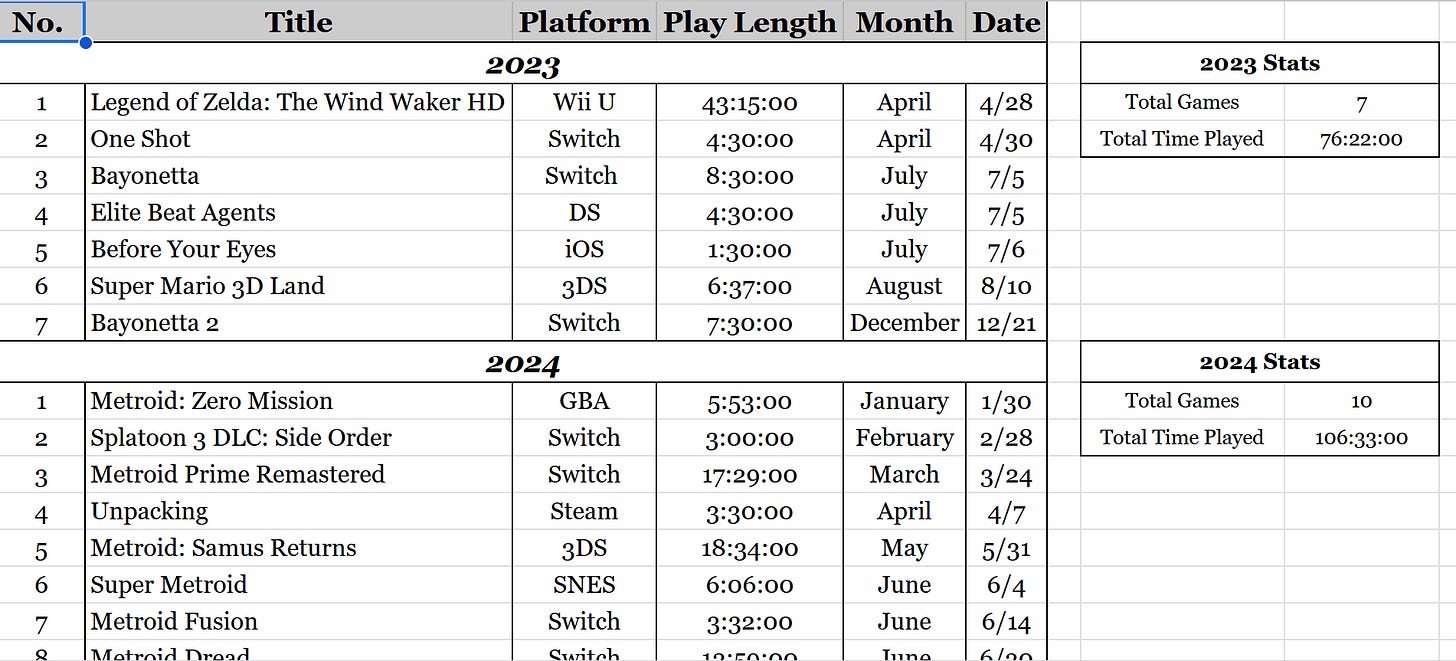
Finally, one other thing that I find helpful to keep backlog stress at bay is a list of completed books/games, structured in a yearly basis. You could do this in an app like Storygraph or GoodReads and let the app tell you how much you read, but the physicality of putting the entry down, writing out how long it is and the exact date you finished the media, can help tremendously with memory. It’s also kind of nice to see how long it took you to read a book or play a game, especially if you have a lot of entries, and which months are the most productive hobby-wise compared to others (e.g. for me, the fall months are miserable media-consumption times).
Demoing the Backlog
One thing that’s helped me with my backlog is demoing a game/book/show that’s coming up next before you get to play/watch/read it. This, of course, depends on the media, as I’m fairly certain there isn’t an easy way to demo a show before watching it properly, other than just watching the first episode. Or, like, watching the trailer, I guess.
Giving it a test run might help decide whether or not the media you’ve put on your list is worth your time, and thus energy. Play an hour of it, read three chapters of it, and see if it’s even something you’d enjoy, because if it’s not, it’s easy to take something off the list and wash your hands of it.
Game Demos
There’s a couple of options for demoing games. First, and the most obvious, is downloading the game’s actual demo. These demos are free, and usually give you a good couple hours of experience with the game to know whether or not you’ll like it. Unfortunately, we also live in an era where game demos aren’t as appreciated, so there aren’t going to be demos for every game.
That’s where borrowing comes in. Of course, there’s Game Pass which is just borrowing with a few extra steps (and a hell of a lot of money), but I’m talking going to your local library and seeing what they have. A lot of the time, you’ll find that your library has a lot of the most recent releases and the most popular games. If not, ask to see if your library is a part of a library system, where you can get inter-library loans from other libraries in your area. Other libraries might have bigger selections, which gives you a higher chance of checking a newer game out.
But, what if the game you wanna play is 15+ years old? This is where things get a little sketchy.
Well, there’s always Nintendo Switch Online (NSO). A regular NSO subscription’s still a decent price, and you get access to a couple of NES, SNES, Gameboy, Gameboy Color games. But, that’s all you get access to, and Pokemon is not on that list as of writing this post. You could subscribe to the higher tier, which is $50 a year and gives you access to N64, GameCube (only if you have a Switch 2), Genesis, and Gameboy Advance games, but again, it’s not a very substantial catalog. If you’re game is there, and you’re willing to spend that hellish price point, then by all means.
There’s also Playstation Plus, but let’s be so real: Nobody has a Playstation Plus subscription. You can see if it’s worth your time and/or money, but it likely won’t be. And that’s the problem with these subscription services: They cost a hell of a lot of money and don’t give you a lot of options to work with.
That’s where emulation comes it. There are very dedicated communities of people on GitHub and Reddit sharing everything they know about emulating and downloading roms, and the backlog of games available on there will shock you. It would be more shocking if you can’t find the game you’re looking for. Of course, I can’t fully condone emulating in a blog post for legal reasons (wink), but you would be surprised what modern phones and laptops can handle in the emulating field of things. If you have an iPhone, Delta Emulator is gonna be your best friend, and if not, RetroArch is a close second (though has a much higher learning curve, so Reddit may be a closer friend to you).
If playing on official hardware is what’s hanging you up on emulating, then there’s plenty of options for that as well. It’s like the joke from a couple of years back, there is nothing easier than modding a 3DS. Plus, 3DS’s can handle 3DS games the best because you’re using the official hardware. PS2 emulation using official PS2’s have also been a highly popular mod, along with modding the PSP or PS Vita to run games on those console, along with PS1 emulation since both consoles sell PS1 games on their storefronts.
And again, you’re just testing to see if you like the game to know whether or not to keep it on your backlog, so you don’t have to play the entire thing emulated, if that’s your concern.
Not that I’m recommending you do this, of course, haha haha….unless.
Book Demos
On the other hand, demoing a book is much harder. I’m not as in the know when it comes to “emulating” books, but I do know that Libby is free with your library card, and you can demo a lot of books on there free of charge.
Also, again, you’re library has a lot of books and often has a limit of like a hundred books checked out, so you can go there, pick up a lot of the books on your TBR, and read a couple of pages to see if you’ll like it. Or, if you don’t have access to a library, you can stop by any book store and read the first few pages of a book on your TBR to know if you’ll like it before purchasing. See for yourself if you’ll actually like the novel, and don’t just assume based on what you hear from BookTok and BookTube.
Outside of that, I do know that Google and Amazon often have sneak peaks of books when you search it by name, so see if that’s a feasible thing. There’s also Kindle Unlimited, which I don’t think you need a Kindle to use as long as you have the app, if you want to test a couple of books, but again, it’s Amazon and a subscription service, so likely not the best choice.
Coming to Terms With Reality
Something you might realize in demoing your backlog is that you don’t actually want to read/watch/play everything on your backlog. You might realize that a game that’s been on there for years isn’t actually as fun as you’d hoped, or a book isn’t enjoyable to read.
In that case, why force yourself to consume something if you don’t like it?
There’s no race to read the most books, play the most games, watch the most shows. Sure, it’s fun to track what you’ve read/watched/played in a year, but that’s all it is. Just a tracker. It’s not meant to force you to read more books this year than last; we don’t have to turn our book trackers into a capitalistic regime where you need to make profits than last quarter. It’s just a fun hobby, and that’s what’s important to remember.
There are a lot of people on YouTube, TikTok, any form of social media that will boast about reading a god-awful book in it’s entirety, or watched a shitty show, or played a horrendously developed game. But you gotta remember that these people do this because 1) it makes them a profit a lot of the time, and 2) they find their own enjoyment out of consuming bad media. You shouldn’t force yourself to consume anything you don’t want to consume for the rating.
You can just give up. It’s alright. I don’t even know if you can consider it “giving up” when you’re consuming media for fun to begin with. You’re just passing on it for now. Maybe in 10-30 years, you’ll come back to it and enjoy it. That only means that it wasn’t made for you as you are in this current moment, and that’s alright.
The Backlog Mantra
Ultimately, it’s important to remember that there is no due date for your backlog. We list out the games we need to play and the books we need to read not because we want a constant reminder of what we haven’t finished, but for the potential of what will be finished.
Games are meant to be fun. Books are meant to be enjoyable. There’s no need to freak out about being unable to finish it, or spending so much time thinking about it that reading books and playing games no longer is exciting. It’s all superficial! The list is fake! You don’t have to actually do anything but what you want to do!
Play what you want to play, not because you were told to play it. Read what you want to read, regardless of what people say is good/bad about it. Do it because you want to, not because you have to. Take as long as you need, because it doesn’t matter how long it takes. It’s all entertainment at the end of the day.
Of course, a lot of this is dependent on whether or not you’re a perfectionist like myself. You might have a non-self-defeating brain and be able to understand that games are meant to be fun and it’s all just a hobby anyway (which, holy shit, what’s that like??). Regardless, it’s a good thing to keep in mind, especially when you lose sight of the purpose of a backlog.
And that’s about it! Starting the new year strong, getting backlog habits out of the way as soon as possible. These are all suggestions, but important things to consider if you’re also feeling overwhelmed by choice.
How have you tackled your backlog? Have any other tips and tricks? What works and what doesn’t? Lemme know in the comments below!
If you wanna read more about my backlogs and how they’re structured, check out my previous blog post: Let Me Rant About My Google Sheets For A Moment.
Like I mentioned in my previous post, I’m starting a new series this year! Aptly named “Monthly Backlog Stackin’,” I will be posting mini-updates every month about my backlog progress so you can see what I’ve been playing, reading, and collecting over the month, as well as my goals moving forward. These posts will go live on the very last day of every month, at noon EST, so stay tuned for that!
And as always, see you next week!

No comments:
Post a Comment